The decision between cloud and your own server is often simplified into two questions: Where will the company’s data be stored, and how much will the solution cost? From a cybersecurity perspective, however, the decision is much more complex.
Cloud is not automatically secure, and an on-premise server is not automatically better protected simply because it is located directly within the company. The final level of security depends on configuration, user management, updates, backups, monitoring, and the company’s ability to respond to a security incident.
For many companies, the best answer is therefore not exclusively cloud or exclusively their own infrastructure. The most practical solution is often a hybrid model that combines the advantages of both environments.
In a cloud-based solution, data, applications, or entire virtual servers are operated within the infrastructure of an external provider. This may include Microsoft 365, Microsoft Azure, Amazon Web Services, Google Cloud, or a private cloud provided by a local data centre.
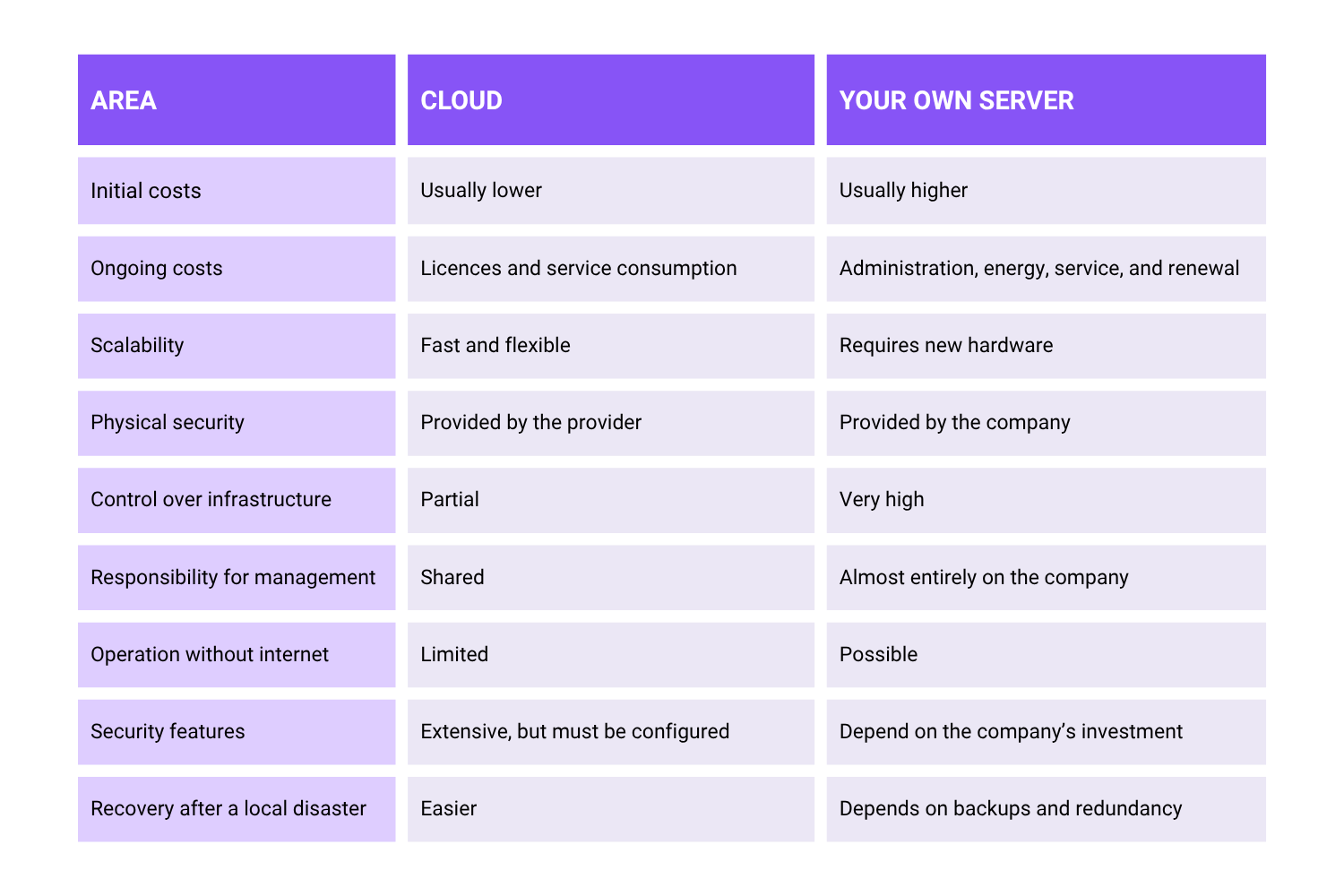
A major advantage of cloud is that the company does not have to secure the physical protection of servers, power supply, cooling, redundant internet connectivity, or hardware replacement on its own. Cloud also allows companies to quickly increase or decrease capacity according to their current needs.
Reputable cloud providers invest significant resources into securing data centres, monitoring infrastructure, and protecting against cyberattacks. As a result, companies gain access to security technologies that could be financially or technically difficult to achieve with their own server.
The main advantages include:
Cloud is particularly beneficial for companies that do not have their own security team or the capacity to manage physical infrastructure continuously.
One of the most common mistakes is the assumption that once data is moved to the cloud, the provider automatically takes care of all security. In reality, cloud works on the principle of shared responsibility.
The provider protects the data centre, hardware, and the underlying cloud platform. However, the company remains responsible for user accounts, passwords, permissions, service configuration, user devices, and, in many cases, its own backups. The scope of responsibility depends on whether the company uses a ready-made SaaS service, a cloud platform, or only a rented virtual server.
Incorrect sharing settings, missing multi-factor authentication, or a compromised administrator account can lead to data leakage even in a technically well-secured cloud environment.
Cloud services are accessible via the internet, which makes cloud accounts a frequent target for phishing, credential theft, and attacks on user identities.
Companies must also take into account other risks:
A cloud-first strategy may therefore not be the ideal solution for every system. For stable workloads, an owned or locally operated server may be more cost-effective in the long term. However, the calculation must also include administration, energy costs, service, hardware renewal, backups, and the cost of a potential outage.
An on-premise solution means that servers, storage, and applications are operated directly within the company, in its own server room, or in a rented rack in a data centre.
The biggest advantage is control. The company decides where the data is located, who has access to it, how systems are configured, and when changes are made.
A local server may be suitable for:
Local infrastructure can be completely separated from the public internet or divided into separate network segments. The company has full control over the firewall, access rules, encryption, updates, and administrator accounts.
Sensitive systems can remain accessible only from the internal network or through a secure VPN connection. With the right design, the attack surface can be significantly reduced.
Full control also means full responsibility. The company must ensure:
Own infrastructure can be very secure, but only if the company actively manages it. An unpatched server without monitoring and with locally connected backups represents a significant risk in the event of a ransomware attack.
An on-premise solution also usually has higher initial costs and requires regular hardware renewal.
In this topic, it is important to distinguish between where data is stored and how user identities are managed.
A domain does not determine whether data is stored in the cloud or on your own server. A domain primarily serves for the central management of users, computers, passwords, access rights, and security policies.
A company can use:
From a security perspective, central identity management is generally more advantageous than separate local accounts on each computer. It allows the company to quickly block a departing employee, introduce unified security policies, restrict administrator rights, and monitor user sign-ins.
However, domain or cloud administrator accounts must be extremely well protected. If they are compromised, an attacker may gain access to a large part of the company environment.
A hybrid model combines local infrastructure with public or private cloud services. The individual environments remain separate, but they cooperate and enable secure data transfer or the use of shared identities.
In practice, a hybrid company environment may look like this:
Such a solution allows companies to keep local applications that require fast response times, specific hardware, or operation without internet access. At the same time, cloud can provide collaboration, remote access, geographically separated backups, disaster recovery, and additional security services.
However, hybrid infrastructure must be properly designed. Combining two environments creates more integration points, accounts, network connections, and security rules. Without central management and monitoring, a hybrid solution can increase complexity instead of reducing risk.
Regardless of where the data is stored, secure infrastructure should include:
Cloud synchronisation is not automatically a full backup. Deletion, corruption, or encryption of data can also be synchronised into the cloud environment. Backup must therefore be designed separately.
Cloud provides flexibility, availability, modern security tools, and less dependence on own hardware. An on-premise server provides control, local performance, independence from internet connectivity, and the ability to keep sensitive or specialised systems directly within the company.
For most small and medium-sized businesses, hybrid infrastructure — the best of both worlds — therefore makes the most sense.
Cloud can be used where it simplifies collaboration, identity management, availability, and data recovery. Local infrastructure is suitable for applications and processes that require low latency, specific integrations, control over data, or operation without internet access.
The most secure solution is not the one labelled “cloud” or “on-premise”. It is the solution that is properly designed, regularly updated, monitored, backed up, and managed according to the real needs of the company.






Copyright © 2026 Všetky práva vyhradené