
The choice between the cloud and your own server usually gets reduced to two questions: where will the company data sit, and what will it cost? From a cybersecurity point of view the decision is considerably more involved.
The cloud is not automatically secure, and your own server is not automatically better protected just because it sits inside the building. What decides the security you end up with is how it is configured, how users are managed, how updates, backup and monitoring are handled, and how well the company can respond to a security incident.
For many companies, then, the best answer is neither the cloud alone nor their own infrastructure alone. The most practical arrangement is usually a hybrid model that combines the strengths of both.
Cloud: security without a server room of your own
With a cloud arrangement, the data, the applications or entire virtual servers run on an external provider's infrastructure. That might be Microsoft 365, Microsoft Azure, Amazon Web Services, Google Cloud or a private cloud from a local data centre.
The big advantage of the cloud is that the company does not have to handle the physical protection of servers, the power, the air conditioning, redundant internet connectivity or the replacement of failed hardware. The cloud also lets you add or reduce capacity quickly as the company's needs change.
What the cloud gives you on security
Reputable cloud providers invest heavily in securing their data centres, monitoring their infrastructure and defending against cyber attacks. The company therefore gets access to security technology that might be out of reach financially, or in terms of staffing, with its own server.
The main advantages are:
- multi-factor authentication is easier to introduce,
- user accounts and permissions are managed centrally,
- sign-ins and administrator changes are logged,
- suspicious behaviour gets detected,
- data centres are geographically separate,
- data stays reachable when a local device fails,
- the cloud platform is updated regularly.
The cloud suits companies without their own security team or without the capacity to manage physical infrastructure around the clock.
But the cloud does not take on all the responsibility
One of the most common mistakes is assuming that moving data to the cloud makes the provider responsible for all of your security. In fact the cloud works on shared responsibility.
The provider protects the data centre, the hardware and the underlying cloud platform. The company remains responsible for user accounts, passwords, permissions, service configuration, user devices and, in many cases, for its own backups. How far that responsibility extends depends on whether the company uses a ready-made SaaS service, a cloud platform, or simply a rented virtual server.
Badly configured sharing, missing multi-factor authentication or a compromised administrator account can lead to a data breach even in a technically very well protected cloud.
The drawbacks and risks of a cloud arrangement
Cloud services are reached over the internet, which makes cloud accounts a frequent target for phishing, credential theft and attacks on user identity.
A company also has to reckon with:
- dependence on the internet connection,
- dependence on the provider staying available,
- recurring licence or running costs,
- the risk of a misconfiguration,
- less straightforward control over where some data is stored,
- costs that can grow if the cloud infrastructure is badly designed,
- a harder move to a different provider.
A cloud-first strategy is therefore not the ideal answer for every system. For stable workloads, your own or a locally hosted server can work out cheaper over time. The calculation has to include administration, energy, servicing, hardware replacement, backup and the cost of an outage.
Your own server: maximum control, and maximum responsibility
An on-premise arrangement means the servers, storage and applications run inside the company, in your own server room or in a rented rack at a data centre.
The biggest advantage is control. The company decides where the data sits, who reaches it, how the systems are configured and when changes happen.
A local server can suit:
- production and technology systems,
- older business applications,
- accounting and ERP systems that depend on the local network,
- large data sets processed inside the company,
- environments with limited internet connectivity,
- systems with particular requirements about where data is held,
- equipment that has to keep working when the internet is down.
The security advantages of your own server
Local infrastructure can be separated from the public internet entirely, or split into separate network segments. The company has full control over the firewall, access rules, encryption, updates and administrator accounts.
Sensitive systems can stay reachable only from the internal network or through a secure VPN connection. Designed properly, this substantially reduces the surface an attacker can work with.
The main drawbacks of your own server
Full control also means full responsibility. The company has to provide:
- regular updates to operating systems and applications,
- protection for endpoints and servers,
- a firewall and network segmentation,
- physical protection for the server room,
- a UPS and backup power,
- monitoring of availability and security events,
- regular recovery testing,
- replacement of ageing hardware,
- a qualified administrator on hand.
Your own infrastructure can be very secure, but only when the company actively looks after it. An unpatched server with no monitoring and locally attached backups is a serious liability in a ransomware attack.
An on-premise arrangement also tends to cost more up front and needs regular hardware replacement.
A domain is not the opposite of the cloud
It matters here to separate where the data lives from how user identities are managed.
A domain does not determine whether data sits in the cloud or on your own server. A domain is mainly for managing users, computers, passwords, access and security policy centrally.
A company can use:
- a local Active Directory domain,
- cloud identity through Microsoft Entra ID,
- a combination of local and cloud identity,
- a hybrid domain infrastructure.
On security, central identity management is generally better than separate local accounts on every computer. It lets you block a departing employee quickly, apply one set of security rules, restrict administrator rights and see who signs in.
Domain and cloud administrator accounts do need exceptional protection, though. Compromising one can open a large part of the company environment to an attacker.
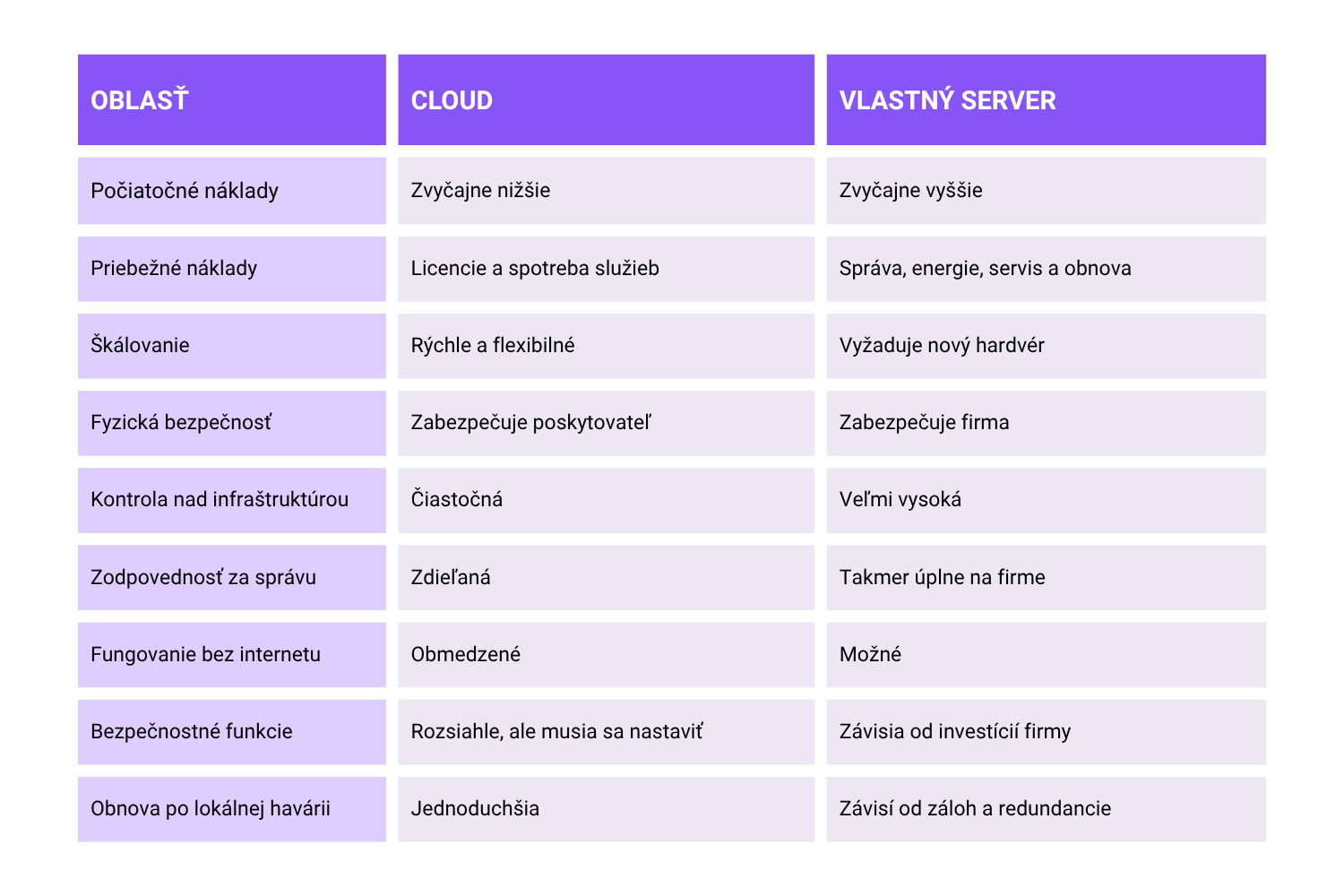
Cloud versus your own server, briefly
A hybrid arrangement: the best of both
A hybrid model combines local infrastructure with public or private cloud services. The environments stay separate but work together, allowing data to move securely and shared identities to be used.
In practice a hybrid company environment might look like this:
- email, calendars and collaboration run in Microsoft 365,
- user identities are managed centrally,
- the sensitive business system stays on a local server,
- local data is backed up to separate cloud storage,
- staff reach internal systems over VPN or secure remote access,
- security events from both the local and the cloud environment are monitored centrally.
An arrangement like this lets you keep local applications that need fast response, particular hardware or the ability to work without the internet. The cloud can then handle collaboration, remote access, geographically separate backups, disaster recovery and other security services.
A hybrid infrastructure does have to be designed properly. Combining two environments brings more integration points, more accounts, more network connections and more security rules. Without central management and monitoring, a hybrid arrangement can add complexity instead of reducing risk.
What a secure company arrangement has to include
Wherever the data sits, secure infrastructure should include:
- multi-factor authentication for users,
- separate administrator accounts,
- least-privilege permissions,
- regular updates,
- encryption of data and communications,
- network segmentation,
- endpoint protection,
- central logging and assessment of events,
- regular user training,
- a security incident response plan,
- backups that are tested regularly,
- at least one backup separated from the production environment.
Cloud synchronisation, incidentally, is not automatically a proper backup. Deleting, damaging or encrypting data can carry straight through into the synchronised copy. Backup therefore has to be designed separately.
In closing: hybrid is the best compromise for most companies
The cloud brings flexibility, availability, current security tools and less dependence on hardware of your own. Your own server gives you control, local performance, independence from the internet and the option of keeping sensitive or specialised systems inside the building.
For most small and medium businesses the arrangement that makes most sense is therefore a hybrid infrastructure, the best of both.
The cloud can go where it simplifies collaboration, identity management, availability and data recovery. Local infrastructure is worth keeping for applications and processes that need low latency, particular integrations, control over the data or operation without the internet.
The most secure arrangement, though, is not the one with "cloud" or "on-premise" written on the box. It is the one that is designed properly, updated regularly, monitored, backed up and managed around what the company actually needs.
Need advice on your IT?
Get in touch and we will design something that fits your company.
Book a consultation